Daily use
Issues and corrective actions
Record what went wrong with a fridge or a reading, what you did about it and when it was resolved, so each problem has a corrective action on file.
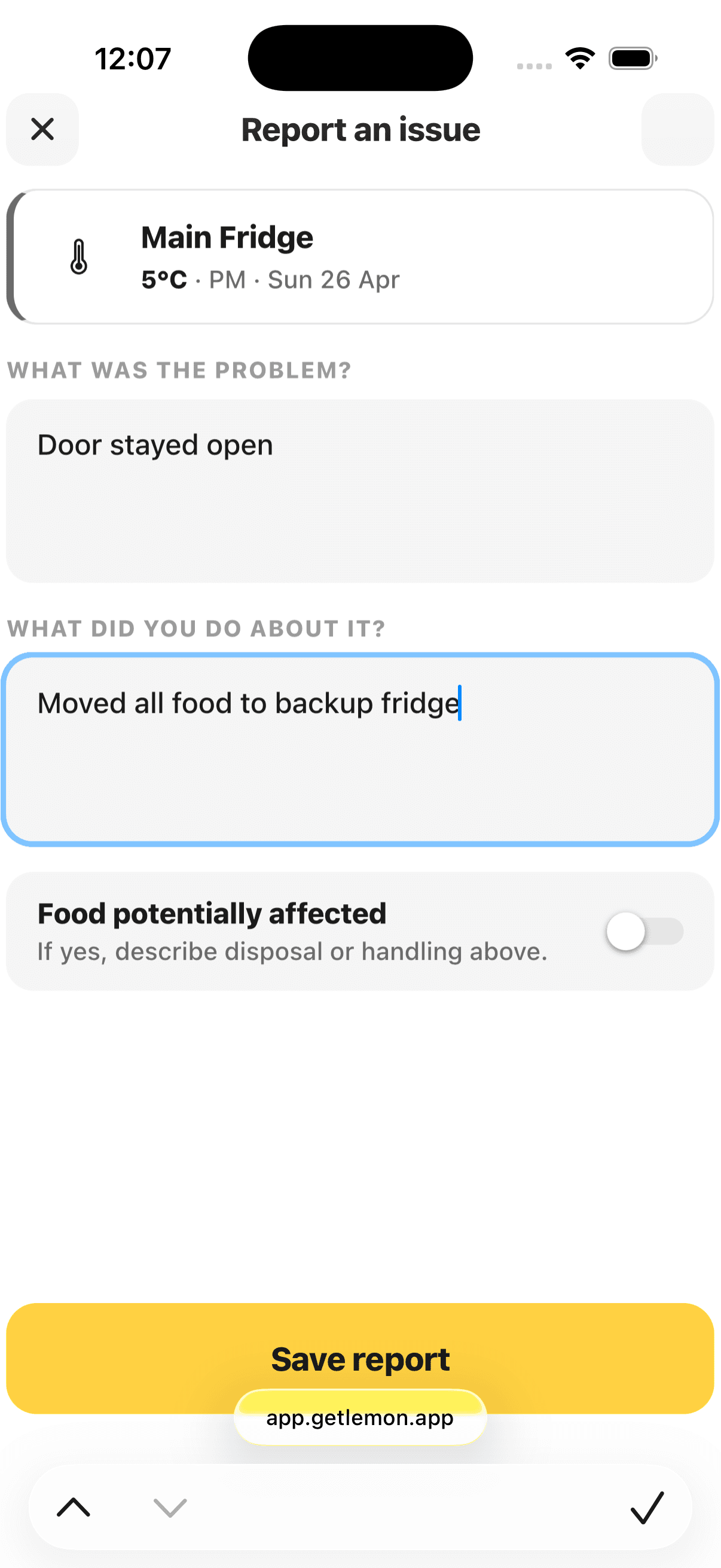
Steps
- In a temperature round, tap Log an issue on the unit. When you save an out-of-range reading, the form opens by itself.
- Under What was the problem?, say what went wrong, such as a damaged door seal.
- Under What did you do about it?, say what you did, including what happened to any food.
- Switch on Food potentially affected if any food was at risk.
- Tap Save report.
The issue is saved against that reading, with your name on it.
Closing it out
Add updates as things develop, then tap Mark as resolved when it is closed out. Open issues show on Today and on the monthly overview, and the whole timeline goes into your exported report: problem, action, resolution.
Good to know
- HACCP Principle 5, in plain English: when something goes wrong, notice it, fix it, and write down what you did. Issues are exactly that, with the writing down mostly done for you.
- If you took no action on an out-of-range reading, tap No action needed and confirm. The reading then appears in your exported report as having no corrective action on record.
- Owners and managers mark an issue as resolved. Staff add what they did as an update, and a manager or owner reviews it.
- A resolved issue cannot be reopened or take more updates. It stays in your records.
- A delivery you turned away is recorded on the delivery itself, with a note on what was wrong. See Deliveries.
Updated